Skip to content
  • Home
  • Introduction
  • Getting Started
    • Registration and Account Creation
  • Admin Area
    • World Map and Missionary Pins
    • Missionary Pages
  • User Interface and Navigation
  • Knowledge Base
  • Videos
  • About
    • Buy Digital Missions Display
    • Troubleshooting and FAQs
    • Updates and Releases
    • Downloads
    • Support and Contact Information
      • Support Form
  • Why Churches Are Replacing Their Missions Boards with Digital Missions Displays?
  • Pastor’s Frequently Asked Questions
  • User FAQ
  • Church Leader FAQ
  • Admin FAQ
  • Register
  • About
    • Videos

    Search Support

    Account Security Best Practices

    3
    • How MissionaryConnect Works
    • Changing Existing Passwords
    • Recommendations for Strong Passwords

    Admin Area

    4
    • Complete Admin Tutorial ( video )
    • Customizing Map Options
    • Managing App Settings and Preferences
    • Accessing and Navigating the Admin Area

    Administration

    1
    • Definitions

    Features

    4
    • Logo Features
    • Settings Tabs
    • Screensaver Slide Types
    • Three Map Styles

    Getting Started

    5
    • What is a Digital Mission Display?
    • Logging In & Managing Your Church
    • Installation and Setup Instructions
    • Intel NUC Mini Computer Setup
    • System Requirements

    Introduction

    5
    • How MissionaryConnect Works
    • Core Features and Benefits
    • Who Is This For and How Is It Used?
    • Purpose of This Website
    • Overview

    Logging In and Out

    2
    • How to Log Out Of Kiosk Mode Safely
    • How To Login to MissionaryConnect

    Missionary Pages

    8
    • Importing Missionary Data
    • Restricted Access Missionaries
    • Cloud Missionaries
    • Managing Location Data
    • Missionary Content Management & Appearance
    • Organizing Missionaries
    • Managing Missionary Data
    • Creating and Editing Missionary Pages

    Registration and Account Creation

    4
    • Create Local Account
    • Local Microsoft User Account
    • How to Create an Account
    • Profile Activation

    Support and Contact Information

    3
    • Discord Server
    • Contact Information for Technical Support and Sales Inquiries
    • Details on How to Get Help and Support

    Troubleshooting and FAQs

    2
    • Common Issues and Their Solutions
    • Frequently Asked Questions

    Updates and Releases

    2
    • Changelog with New Features, Improvements, and Bug Fixes
    • Information About the Latest Updates and Releases

    User Interface and Navigation

    4
    • User Profile Training
    • Navigating Through MissionaryConnect
    • Explanation of Icons, Buttons, and Menus
    • Overview of the Map Interface Elements

    World Map and Missionary Pins

    3
    • Displaying and Interacting with the World Map
    • Customizing Pin Appearance and Behavior
    • Understanding and Managing Missionary Pins
    • MC Docs Home
    • MissionaryConnect Knowledge Base
    • Features
    • Three Map Styles
    View Categories

    Three Map Styles

    Reading time: 1 Minute Read Time

    AI Doc Summarizer Doc Summary
    AI Doc Summarizer Thinking Thinking

    MissionaryConnect Map Views #

    MissionaryConnect includes three different map views that allow churches to explore the missionaries they support in different ways. Each view offers a unique experience for displaying and interacting with missionary profiles.

    Church administrators and members can switch between these views at any time using the view controls in the upper corner of the display.

    Globe View #

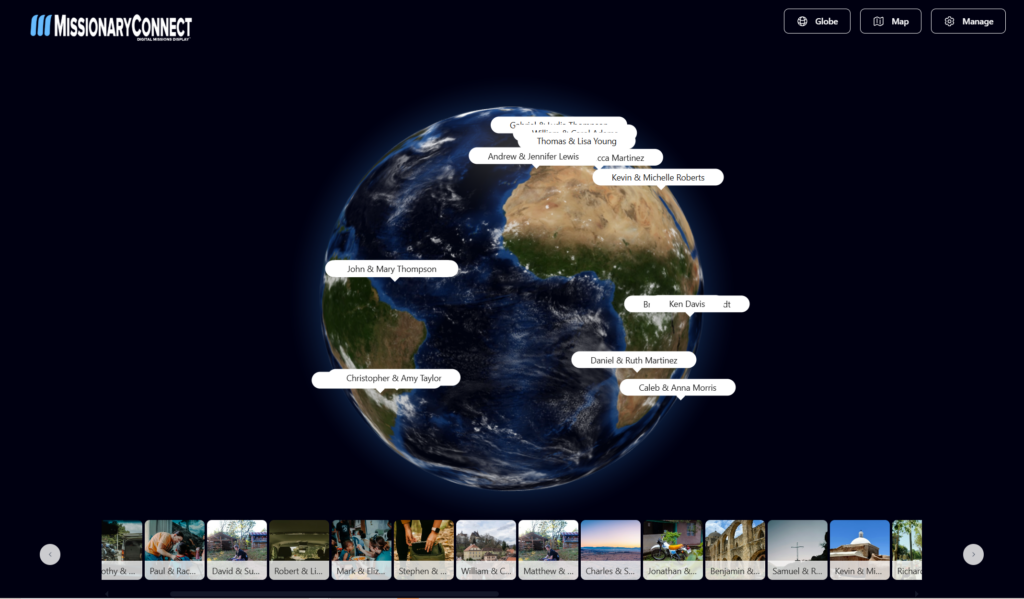
    Globe View displays missionaries on a rotating 3D globe.

    This view allows users to spin the earth and explore different parts of the world visually. Missionaries appear as markers on the globe, and when a marker is selected a callout shows the missionary’s name and location.

    The Globe View is the most visually engaging display and works especially well on large touchscreen monitors in a church foyer because it highlights the global reach of the church’s missions program.

    Key characteristics:

    • 3D rotating earth
    • Interactive zoom and rotation
    • Missionary markers displayed on the globe
    • Click or tap to open missionary information

    MissionaryConnect-Map-Featured-Landing-Page img

    Map View #

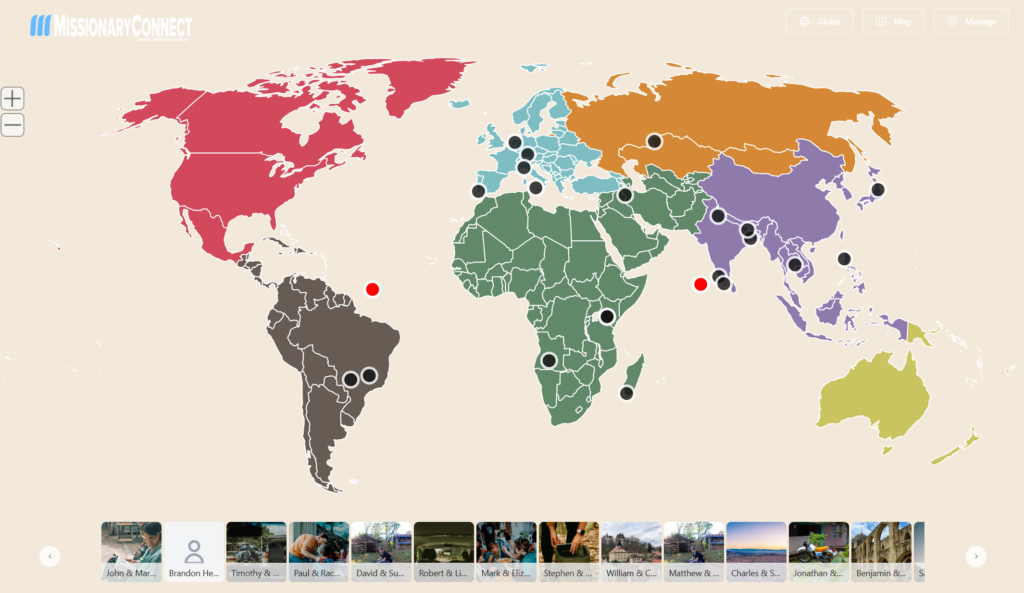
    Map View presents missionaries on a flat world map.

    Instead of a rotating globe, this view shows a traditional map projection of the world. Continents and countries are clearly displayed, making it easier to view multiple missionaries at once.

    Map View is helpful when a church supports a large number of missionaries because it spreads the locations across a full map rather than clustering them on a globe.

    Key characteristics:

    • Flat world map
    • Region-based layout
    • Missionary pins marking locations
    • Easier to view many missionaries at once

    MissionaryConnect-Grid-Featured-Landing-Page img

    Card View #

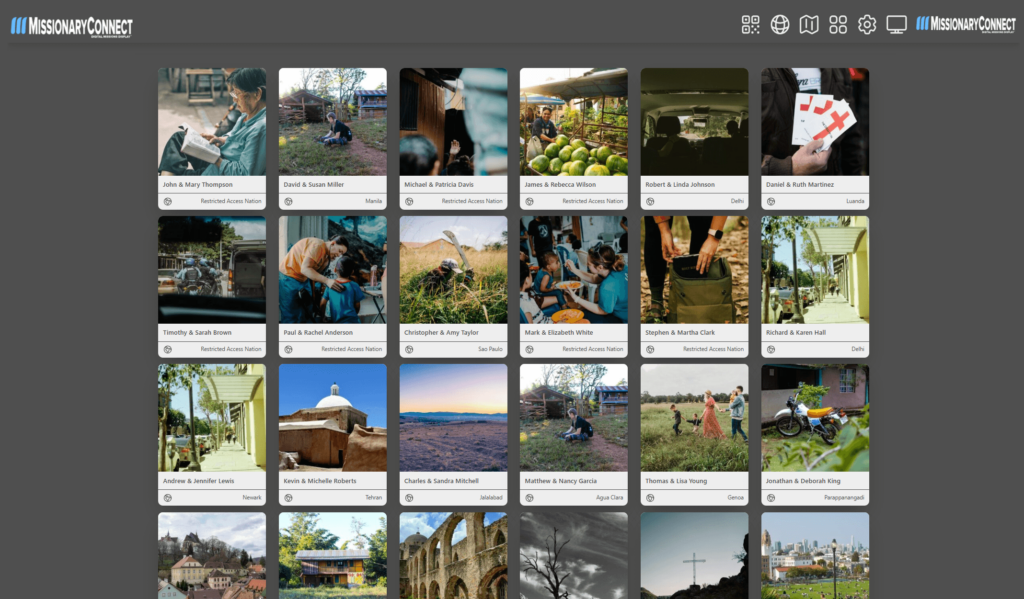
    Grid View, sometimes referred to as Card View, focuses on the missionaries themselves rather than their geographic location.

    Missionaries appear as profile cards with their photo, name, and ministry information. Users can scroll or browse through these cards to learn more about each missionary.

    This view is ideal for situations where users want to quickly browse missionary profiles without navigating the map.

    Key characteristics:

    • Missionary profile cards
    • Grid-style layout
    • Emphasis on missionary photos and names
    • Easy browsing of many missionaries

    View

    Globe View

    Map View

    Grid / Card View

    Focus

    Global Visualization

    Geographic clarity

    Missionary profiles

    Best For

    Interactive foyer displays

    Churches with many missionaries

    Browsing missionaries

    Choosing the Best View #

    Each map view serves a different purpose:

    Globe View highlights the global nature of missions.
    Map View provides a clear overview of missionary locations.
    Card View focuses on the missionaries themselves.

    Churches can easily switch between views to create the experience that best fits their display environment and the number of missionaries they support.

    What are your Feelings

    Share This Article :

    • Facebook
    • X
    • LinkedIn
    • Pinterest
    Still stuck? How can we help?

    How can we help?

    Screensaver Slide TypesLogo Features
    Table of Contents
    • MissionaryConnect Map Views
      • Globe View
      • Map View
      • Card View
      • Choosing the Best View

    CONTACT INFORMATION

    Digital Missions Display
    149 Double Creek Dr
    Gaffney, SC 29341
    Ph/Text: 734.330.0570

    • Terms of Use
    • Privacy Policy

    Podcast Interviews

    Missionary Profile Podcast

    DISCOVER DOCUMENTATION

    Site Links

    • Home
    • Introduction
    • Getting Started
      • Registration and Account Creation
    • Admin Area
      • World Map and Missionary Pins
      • Missionary Pages
    • User Interface and Navigation
    • Knowledge Base
    • Videos
    • About
      • Buy Digital Missions Display
      • Troubleshooting and FAQs
      • Updates and Releases
      • Downloads
      • Support and Contact Information
        • Support Form

    FRIENDS IN MINISTRY

    Flagship Ministry


    200x75 digital missions display logo img

    A Believers Ministry

    • Terms of Use
    • Privacy Policy
    Copyright 2015 - 2026 | Another WordPress Website by: Digital Missions Display™

    Leave Us a 5 Star Review Today!

    Google Reviews
    X