Skip to content
  • Home
  • Introduction
  • Getting Started
    • Registration and Account Creation
  • Admin Area
    • World Map and Missionary Pins
    • Missionary Pages
  • User Interface and Navigation
  • Knowledge Base
  • Videos
  • About
    • Buy Digital Missions Display
    • Troubleshooting and FAQs
    • Updates and Releases
    • Downloads
    • Support and Contact Information
      • Support Form
  • Why Churches Are Replacing Their Missions Boards with Digital Missions Displays?
  • Pastor’s Frequently Asked Questions
  • User FAQ
  • Church Leader FAQ
  • Admin FAQ
  • Register
  • About
    • Videos

    Search Support

    Account Security Best Practices

    3
    • How MissionaryConnect Works
    • Changing Existing Passwords
    • Recommendations for Strong Passwords

    Admin Area

    4
    • Complete Admin Tutorial ( video )
    • Customizing Map Options
    • Managing App Settings and Preferences
    • Accessing and Navigating the Admin Area

    Administration

    7
    • Windows Kiosk Performance Setup Guide
    • Provisioning Your New Android Device
    • Group Policy
    • Creating A Profile Claim
    • Kiosk Setup
    • Definitions
    • Activating Kiosk Mode ( Legacy )

    Features

    4
    • Logo Features
    • Settings Tabs
    • Screensaver Slide Types
    • Three Map Styles

    Getting Started

    5
    • What is a Digital Mission Display?
    • Logging In & Managing Your Church
    • Installation and Setup Instructions
    • Intel NUC Mini Computer Setup
    • System Requirements

    Introduction

    5
    • How MissionaryConnect Works
    • Core Features and Benefits
    • Who Is This For and How Is It Used?
    • Purpose of This Website
    • Overview

    Logging In and Out

    2
    • How to Log Out Of Kiosk Mode Safely
    • How To Login to MissionaryConnect

    Missionary Pages

    8
    • Importing Missionary Data
    • Restricted Access Missionaries
    • Cloud Missionaries
    • Managing Location Data
    • Missionary Content Management & Appearance
    • Organizing Missionaries
    • Managing Missionary Data
    • Creating and Editing Missionary Pages

    Registration and Account Creation

    4
    • Create Local Account
    • Local Microsoft User Account
    • How to Create an Account
    • Profile Activation

    Support and Contact Information

    3
    • Discord Server
    • Contact Information for Technical Support and Sales Inquiries
    • Details on How to Get Help and Support

    Troubleshooting and FAQs

    2
    • Common Issues and Their Solutions
    • Frequently Asked Questions

    Updates and Releases

    2
    • Changelog with New Features, Improvements, and Bug Fixes
    • Information About the Latest Updates and Releases

    User Interface and Navigation

    5
    • User Profile Training
    • Understanding the Icon Bar
    • Navigating Through MissionaryConnect
    • Explanation of Icons, Buttons, and Menus
    • Overview of the Map Interface Elements

    World Map and Missionary Pins

    3
    • Displaying and Interacting with the World Map
    • Customizing Pin Appearance and Behavior
    • Understanding and Managing Missionary Pins
    • MC Docs Home
    • MissionaryConnect Knowledge Base
    • Account Security Best Practices
    • How MissionaryConnect Works
    View Categories

    How MissionaryConnect Works

    Reading time: 2 Minute Read Time

    AI Doc Summarizer Doc Summary
    AI Doc Summarizer Thinking Thinking
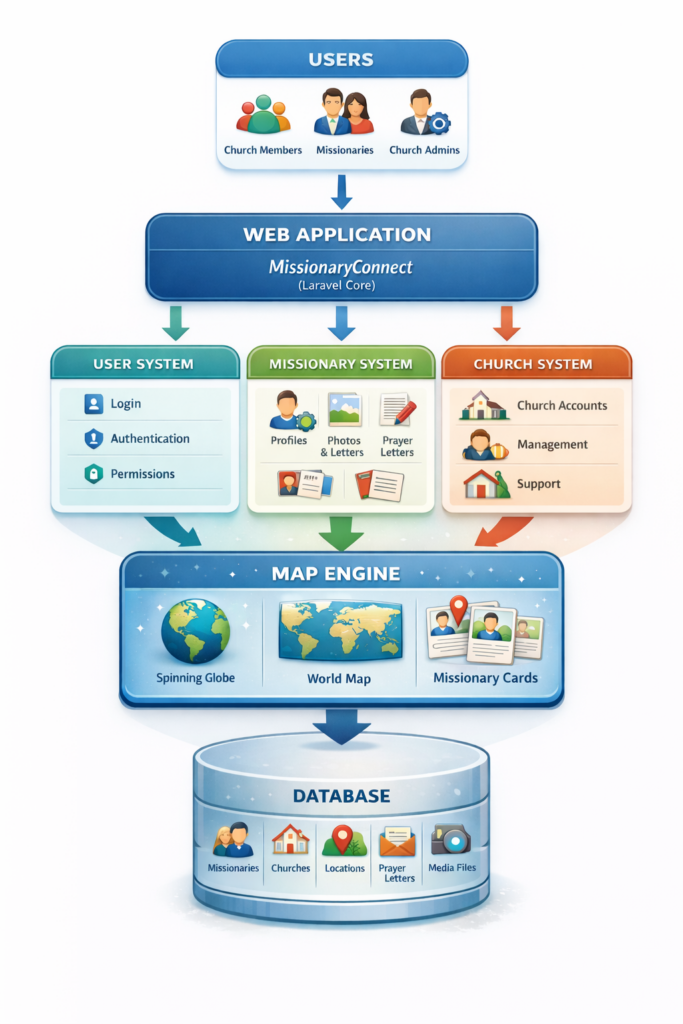
    how missionaryconnect works diagram image

    MissionaryConnect is designed to help churches keep missionaries visible before their congregation. The system brings together missionary profiles, location data, media, and updates into one unified platform that powers the Digital Missions Display and the MissionaryConnect web application.

    At its core, MissionaryConnect is a structured system that organizes missionary information and presents it through an interactive world map and profile pages.

    System Architecture #

    MissionaryConnect is built on the Laravel web application framework. Laravel provides the structure for how the application processes requests, stores information, and renders pages.

    The platform is organized into several key components:

    Application Logic
    Handles how the system processes requests, updates missionary profiles, and manages church data.

    Routing System
    Directs incoming web requests to the correct part of the application.

    Database Layer
    Stores all missionary information, churches, users, prayer letters, and location data.

    User Interface
    Displays the map, missionary profiles, and administrative tools that users interact with.

    This structure allows the platform to remain stable, secure, and scalable as more churches and missionaries are added.

    Core Features #

    MissionaryConnect provides several major features that power the Digital Missions Display.

    Interactive World Map
    Missionaries are placed on a spinning globe or world map using geographic coordinates. Users can zoom into regions and click on missionary pins to view their profile pages.

    Missionary Profiles
    Each missionary has a dedicated profile page that can include:

    • Name and family information
    • Sending church
    • Mission field
    • Photos and videos
    • Prayer letters and updates

    These profiles allow church members to learn about missionaries and stay connected to their work.

    Administrative Management
    Church administrators have tools to manage missionary profiles, control what content is visible, and update information as missionaries move or publish new updates.

    Account Authentication
    The platform uses a secure authentication system that allows churches, missionaries, and administrators to log in and manage their accounts safely.

    Data Flow #

    MissionaryConnect follows a simple but powerful data flow process.

    1. Missionary information is stored in the database.

    2. Location coordinates are assigned to the missionary profile.

    3. The map system retrieves the coordinates and places pins on the map.

    4. When a user clicks a pin, the missionary profile is loaded and displayed.

    This process allows the map to dynamically update as new missionaries are added or profiles are updated.

    Security and Visibility Controls #

    MissionaryConnect includes visibility controls to protect missionaries serving in sensitive locations.

    Profiles can be marked as private, restricted, or public depending on the needs of the missionary and the church.

    This ensures that missionaries in restricted areas can still be represented without exposing sensitive information.

    Dependencies #

    MissionaryConnect relies on several technologies that work together to power the system.

    • Laravel web framework
    • Tailwind CSS for the interface
    • Database storage for missionary records
    • Stripe integration for subscription management
    • Geographic location services for mapping

    These technologies allow the platform to remain fast, secure, and flexible.

    Deployment #

    MissionaryConnect runs as a web application hosted on a private and secure web server. The application has a primary and secondary data center. One data center is on the East Coast, the other is in the Midwest. This redundancy assures subscribers that their data will be accessible.

    Churches access the system through a web browser, and the Digital Missions Display can run in kiosk mode on dedicated display devices like Android 13, Windows Pro, or MacOS.

    Because the system is web-based, updates and improvements can be deployed without requiring users to install new software.

    Purpose of the Platform #

    The mission behind MissionaryConnect is simple.

    To help churches keep the harvest field prayed up and visible.

    By bringing missionary information, media, and updates into one platform, churches can strengthen their connection to the missionaries they support and encourage greater prayer and engagement.

    What are your Feelings

    Share This Article :

    • Facebook
    • X
    • LinkedIn
    • Pinterest
    Still stuck? How can we help?

    How can we help?

    Recommendations for Strong PasswordsChanging Existing Passwords
    Table of Contents
    • System Architecture
    • Core Features
    • Data Flow
    • Security and Visibility Controls
    • Dependencies
    • Deployment
    • Purpose of the Platform

    CONTACT INFORMATION

    Digital Missions Display
    149 Double Creek Dr
    Gaffney, SC 29341
    Ph/Text: 734.330.0570

    • Terms of Use
    • Privacy Policy

    Podcast Interviews

    Missionary Profile Podcast

    DISCOVER DOCUMENTATION

    Site Links

    • Home
    • Introduction
    • Getting Started
      • Registration and Account Creation
    • Admin Area
      • World Map and Missionary Pins
      • Missionary Pages
    • User Interface and Navigation
    • Knowledge Base
    • Videos
    • About
      • Buy Digital Missions Display
      • Troubleshooting and FAQs
      • Updates and Releases
      • Downloads
      • Support and Contact Information
        • Support Form

    FRIENDS IN MINISTRY

    Flagship Ministry


    200x75 digital missions display logo img

    A Believers Ministry

    • Terms of Use
    • Privacy Policy
    Copyright 2015 - 2026 | Another WordPress Website by: Digital Missions Display™

    Leave Us a 5 Star Review Today!

    Google Reviews
    X