Skip to content
  • Home
  • Introduction
  • Getting Started
    • Registration and Account Creation
  • Admin Area
    • World Map and Missionary Pins
    • Missionary Pages
  • User Interface and Navigation
  • Knowledge Base
  • Videos
  • About
    • Buy Digital Missions Display
    • Troubleshooting and FAQs
    • Updates and Releases
    • Downloads
    • Support and Contact Information
      • Support Form
  • Why Churches Are Replacing Their Missions Boards with Digital Missions Displays?
  • Pastor’s Frequently Asked Questions
  • User FAQ
  • Church Leader FAQ
  • Admin FAQ
  • Register
  • About
    • Videos

    Search Support

    Account Security Best Practices

    3
    • How MissionaryConnect Works
    • Changing Existing Passwords
    • Recommendations for Strong Passwords

    Admin Area

    4
    • Complete Admin Tutorial ( video )
    • Customizing Map Options
    • Managing App Settings and Preferences
    • Accessing and Navigating the Admin Area

    Administration

    7
    • Windows Kiosk Performance Setup Guide
    • Provisioning Your New Android Device
    • Group Policy
    • Creating A Profile Claim
    • Kiosk Setup
    • Definitions
    • Activating Kiosk Mode ( Legacy )

    Features

    4
    • Logo Features
    • Settings Tabs
    • Screensaver Slide Types
    • Three Map Styles

    Getting Started

    5
    • What is a Digital Mission Display?
    • Logging In & Managing Your Church
    • Installation and Setup Instructions
    • Intel NUC Mini Computer Setup
    • System Requirements

    Introduction

    5
    • How MissionaryConnect Works
    • Core Features and Benefits
    • Who Is This For and How Is It Used?
    • Purpose of This Website
    • Overview

    Logging In and Out

    2
    • How to Log Out Of Kiosk Mode Safely
    • How To Login to MissionaryConnect

    Missionary Pages

    8
    • Importing Missionary Data
    • Restricted Access Missionaries
    • Cloud Missionaries
    • Managing Location Data
    • Missionary Content Management & Appearance
    • Organizing Missionaries
    • Managing Missionary Data
    • Creating and Editing Missionary Pages

    Registration and Account Creation

    4
    • Create Local Account
    • Local Microsoft User Account
    • How to Create an Account
    • Profile Activation

    Support and Contact Information

    3
    • Discord Server
    • Contact Information for Technical Support and Sales Inquiries
    • Details on How to Get Help and Support

    Troubleshooting and FAQs

    2
    • Common Issues and Their Solutions
    • Frequently Asked Questions

    Updates and Releases

    2
    • Changelog with New Features, Improvements, and Bug Fixes
    • Information About the Latest Updates and Releases

    User Interface and Navigation

    5
    • User Profile Training
    • Understanding the Icon Bar
    • Navigating Through MissionaryConnect
    • Explanation of Icons, Buttons, and Menus
    • Overview of the Map Interface Elements

    World Map and Missionary Pins

    3
    • Displaying and Interacting with the World Map
    • Customizing Pin Appearance and Behavior
    • Understanding and Managing Missionary Pins
    • MC Docs Home
    • MissionaryConnect Knowledge Base
    • Administration
    • Definitions
    View Categories

    Definitions

    Reading time: 2 Minute Read Time

    AI Doc Summarizer Doc Summary
    AI Doc Summarizer Thinking Thinking

    MissionaryConnect.app #

    A web-based Missions Wall presentation platform designed to help Baptist churches visually and interactively connect members with their supported missionaries. Built by Paul Douglas and the Digital Missions Display team, MissionaryConnect.app centralizes missionary information into a dynamic, church-controlled digital experience.

    Map Views #

    Global Vision #

    A live, constantly rotating, interactive globe view of the world displaying every missionary your church supports across the globe. Includes interactive pinch and zoom features.

    This perspective reminds your congregation that the Great Commission is bigger than one city or one nation. It helps members see the scope of your church’s missions outreach at a glance and keeps the harvest in front of their eyes.

    missionaryconnect globe vision map image

    Mission Fields #

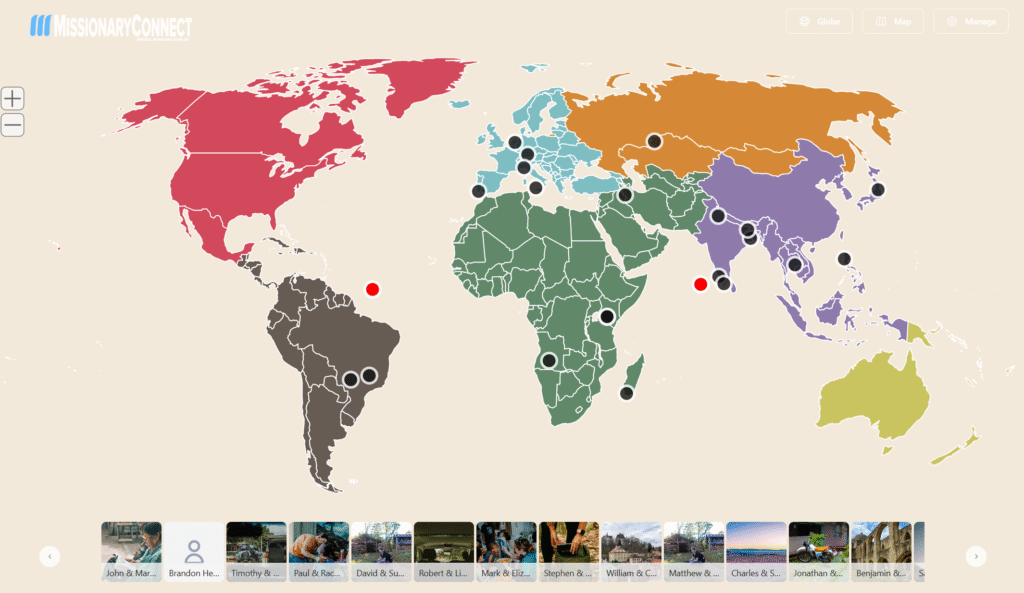
    A colored flat world map highlighting the specific regions, countries, and cities where your missionaries are serving. Every country on this map is interactive. Simply tap a nation to view the missionaries serving in that location, along with their ministry details and updates. Includes interactive pinch and zoom features.

    This view helps members understand where the work is taking place and encourages focused, informed prayer for each field.
    missionaryconnect interactive flat map image

    Mission Family #

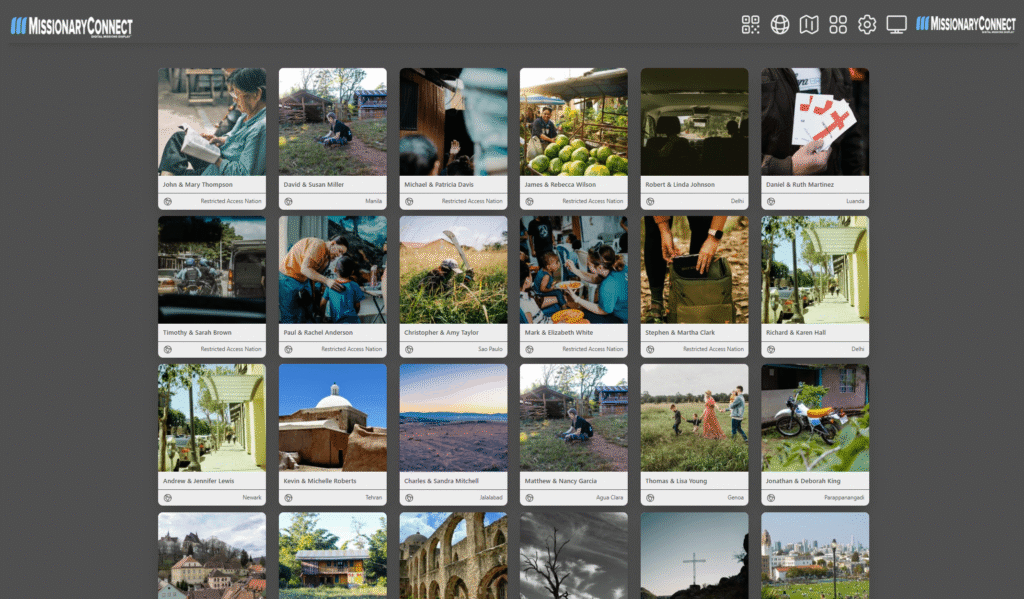
    A visual gallery of the missionaries, in card format, that your church supports. These cards feature names, photos, and ministry details.

    This view strengthens personal connection, making it easy for members to recognize, pray for, and stay engaged with the families they are helping send.
    missionaryconnect interactive grid mission fields card view image

    Digital Missions Wall #

    A large-screen or lobby-based interactive display that showcases a church’s missionaries through a touchscreen or kiosk-style presentation. Unlike static bulletin boards, a Digital Missions Wall allows members to explore missionary profiles, prayer requests, and updates in real time.

    Missionary Profile #

    An individual page within MissionaryConnect.app dedicated to a specific missionary or missionary family. A Missionary Profile typically includes:

    • Scannable QR Code to Send Email
    • Country Data – Demographics, Religious Composition, People Groups & Languages, Bible Translation Status. Real-time data provided by the Joshua Project 
    • Testimony/Biography
    • Photos
    • Video Updates
    • Sending Board/Agency
    • Country or Field or Service
    • Contact Information 
    • Ministry Update
    • Ministry Description

    Activate Map #

    Turns your church’s map display on. When activated, your missionaries and approved content appear on your live display. This locks the Admin area and puts the browser in Kiosk Mode.

    Display Map #

    Activates your church’s live map display. Once turned on, your missionaries and approved content will appear on the public screen. This does not lock the Admin area or enable Kiosk Mode.

    Kebab Menu ⋮ #

    The three vertical dots icon used to manage additional options. Click or tap this menu to view more actions related to the current missionary, prayer letter, images, video, or content section. It provides quick access to settings and tools without crowding the main screen.

    Manage Prayer Requests #

    Create and publish prayer needs that appear on both the Global Vision and the Mission Field Map.

    Prayer Letter #

    A PDF, .jpg, .png., or text field document uploaded by a missionary that can be viewed directly within their profile

    Navigation & Admin #

    Church Home
    Dashboard showing Church Profile and Missionary Quick Edit List.

    My Churches
    List of churches you manage.

    Insights
    Learn about how folks interact with the Maps

    View Map
    Opens the public-facing profile of your church as others see it, including logo, description, missionaries, and shared content.

    Prayer Requests
    A chronological activity feed showing updates related to your church, such as new posts, uploaded media, or missionary activity.

    Church Details
    Basic identifying information about your church including name, address, website, and contact information.

    Church History
    Your church’s story, heritage, founding background, and ministry legacy.

    Posts
    Written updates, announcements, or ministry highlights shared by your church.

    Videos
    Uploaded or linked video content related to your church or missions program.

    Images
    Individual photos available for display on your church profile.

    Albums
    Organized collections of photos grouped by events, ministries, or themes.

    Users
    Individuals who have access to manage or interact with your church’s profile inside MissionaryConnect.

    Invitations
    Pending invitations sent to individuals you’ve asked to join your church’s management team.

    Requests to Join
    User requests from individuals asking for access to help manage your church’s profile.

    What are your Feelings

    Share This Article :

    • Facebook
    • X
    • LinkedIn
    • Pinterest
    Still stuck? How can we help?

    How can we help?

    Kiosk SetupActivating Kiosk Mode ( Legacy )
    Table of Contents
    • MissionaryConnect.app
    • Map Views
    • Global Vision
    • Mission Fields
    • Mission Family
    • Digital Missions Wall
    • Missionary Profile
    • Activate Map
    • Display Map
    • Kebab Menu ⋮
    • Manage Prayer Requests
    • Prayer Letter
    • Navigation & Admin

    CONTACT INFORMATION

    Digital Missions Display
    149 Double Creek Dr
    Gaffney, SC 29341
    Ph/Text: 734.330.0570

    • Terms of Use
    • Privacy Policy

    Podcast Interviews

    Missionary Profile Podcast

    DISCOVER DOCUMENTATION

    Site Links

    • Home
    • Introduction
    • Getting Started
      • Registration and Account Creation
    • Admin Area
      • World Map and Missionary Pins
      • Missionary Pages
    • User Interface and Navigation
    • Knowledge Base
    • Videos
    • About
      • Buy Digital Missions Display
      • Troubleshooting and FAQs
      • Updates and Releases
      • Downloads
      • Support and Contact Information
        • Support Form

    FRIENDS IN MINISTRY

    Flagship Ministry


    200x75 digital missions display logo img

    A Believers Ministry

    • Terms of Use
    • Privacy Policy
    Copyright 2015 - 2026 | Another WordPress Website by: Digital Missions Display™

    Leave Us a 5 Star Review Today!

    Google Reviews
    X